
Let's Talk Solutions presents

LaunchPad for Jira Service Management

Deploy a working Jira service structure in minutes.

LaunchPad installs the structured Assets layer underneath your service desk, so tickets route correctly, ownership exists, and reporting becomes operational from day one.

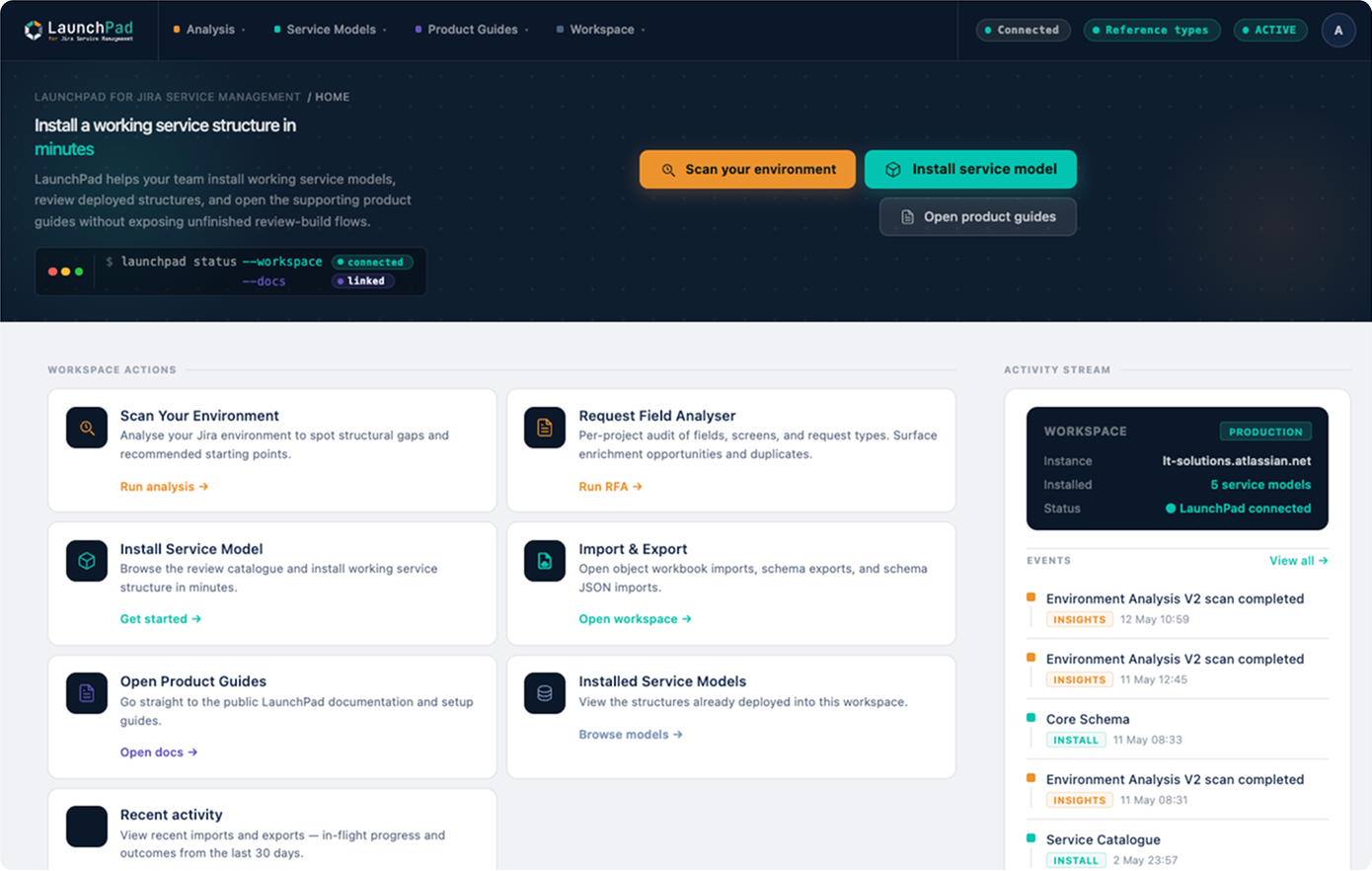
LaunchPad home screen inside Jira Service Management, showing workspace actions, scan environment, install service model, RFA, and import and export.
The problem

Without structured Assets data, five things never quite work.

Most teams stand up Jira Service Management, get requests flowing, and never finish the layer underneath. Data goes into free-text fields instead of structured objects. It works well enough to limp along, until you try to do any of these five things.

70 to 80%
of CMDB programmes fail to deliver the business value they were stood up for.

Source: Gartner

60%
data accuracy ceiling on most active CMDBs, the level at which reports stop being trusted.

Source: Gartner

20 to 40%
data decay in poorly maintained CMDBs, pushing MTTR and operational cost up.

Source: IP Fabric

Read our approach to the 70 to 80% failure rate
  • Reporting

    You cannot aggregate by attributes that do not exist as data.

  • Automation

    Rules need predicates. Predicates need fields. Fields need a schema.

  • Routing

    Tickets cannot route to a team or service that was never modelled.

  • Ownership

    If no object owns the service, nobody owns the outcome.

  • Rovo and automation

    Anything that reads your data, from automation rules to Rovo, has nothing structured to work with. The newest example of the same gap.

The answer

Structure closes all five.

LaunchPad installs a typed Assets layer underneath your service desk. Same five labels, opposite outcome. Reporting works on data that exists, automation rules find the fields they need, routing lands somewhere real, ownership has an object that holds it, and anything downstream reads structure instead of free text.

  • Reporting

    Aggregate by typed attributes that exist as data, not by free-text strings to interpret.

  • Automation

    Rules read predicates that resolve. The fields exist. The schema holds them.

  • Routing

    Service, owner, and support team are objects. Tickets route to a real destination.

  • Ownership

    Every service has an owner object. The escalation path is a query, not folk knowledge.

  • Rovo and automation

    A structured layer anything downstream can read. The newest example of the same gap, closed.

How it works

Scan it. Structure it. Connect it.

One platform, three implementation phases. Each capability shows its in-app label in parentheses once, so there is no post-install confusion.

01

Environment Analysis · Discovery (Scan Your Environment in the app)

Scan and recommend

Read-only scan of your service desks, request types, fields, and workflows. Environment Analysis recommends the service models that fit your setup, with transparent match scores and reasoning.

See full detail
02

Service Models · Structure (Install from the app)

Install a model

Deploy a curated service model additively, with its full object structure, relationships, and ownership patterns. Review the impact before anything lands.

See full detail
03

Request Flow Analysis · Operational Adoption (Request Field Analyser in the app)

Connect requests to structure

Scans request types for free-text fields and duplicated values that should be Assets objects. Generates the exact configuration recipe you apply yourself.

See full detail
Service models

Implementation-ready Assets service models.

LaunchPad installs additively, so structure lands alongside what you already run. The library covers the common ITSM areas: CMDB foundations, service catalogue, software asset management, vendors, cybersecurity, workforce, documentation, and enterprise IT. These are not blank templates. They are opinionated, ITIL-aligned schemas built from real enterprise work, each mapped to named ITIL practices. The Service Catalogue model, for example, ships eight object types, including Business Service, Service Owner, Support Team, and Service Level. Install one, review it, adapt it, extend it.

Service Catalogue

Business Service, Service Owner, Support Team, Service Level. Eight object types, ITIL-aligned.

View ITIL mapping

Enterprise IT CMDB

Twenty-one object types for organisations running enterprise IT operations end to end.

View ITIL mapping

Standard CMDB

Twelve object types covering core configuration items, relationships, and ownership.

View ITIL mapping

Software Asset Management

Ten object types for licences, entitlements, installations, and software lifecycle.

View ITIL mapping

Basic CMDB

Four object types. The smallest viable CMDB structure, for teams starting from scratch.

View ITIL mapping

Core Schema

Seven object types covering the shared building blocks the other models reference.

View ITIL mapping

Priority Matrix

Four object types for structured priority, urgency, and impact instead of free text.

View ITIL mapping

SLA Management

Three object types for service levels, targets, and the responsibilities attached to them.

View ITIL mapping

Cloud-Native Infrastructure

Ten object types for cloud accounts, services, workloads, and the dependencies between them.

View ITIL mapping

Cybersecurity Asset Inventory

Five object types for asset inventory in security operations and audit contexts.

View ITIL mapping

Vendor Management

Eleven object types for vendors, contracts, contacts, and the services they provide.

View ITIL mapping

Workforce Management

Twelve object types for people, roles, locations, and the services they consume.

View ITIL mapping

Documentation Management

Seven object types for runbooks, policies, references, and the assets they describe.

View ITIL mapping

Swipe to see the full library

Workbook Engine

Import that is checked against your schema before anything lands.

Installing a schema is half the job. Getting data in is the other half, and it is where most Assets rollouts stall. The Workbook Engine (Import and Export in the app) generates a guided Excel workbook for any installed schema, one sheet per object type, with reference fields included. You fill it in, or paste in data you have already exported. On upload, LaunchPad checks every value against your live schema through the Assets API before anything is written. If an attribute is a date and the cell holds an IP address, that value fails validation rather than importing data the schema cannot hold. The validation is LaunchPad’s own logic running against the schema you actually installed, not a generic CSV passthrough, so what lands matches the structure you built.

See how the Workbook Engine works

What lands matches the schema

  • One sheet per object type
  • Reference fields included, relationships preserved
  • Validated against your live schema through the Assets API
  • Values that the schema cannot hold fail before they import
Safety band

You choose every change. Nothing goes live until you apply it.

LaunchPad reads your configuration and adds structure alongside what you already have. It does not merge, repair, or overwrite existing objects. When it creates a structured field, it creates a new field. It never alters your existing free-text field, and it never adds anything to your request forms on its own. Your existing fields and all their history stay exactly as they are, so you can move at your own pace and pre-populate history before you switch anything over. It runs on Atlassian Forge inside your own tenant, and no customer data leaves your instance.

  • Read-only scan
    It looks first, changes nothing until you choose to
  • Additive
    It adds structure, never overwrites what exists
  • Forge-native
    Runs in your tenant, no customer data export
  • Marketplace
    Available on the Atlassian Marketplace
Proof

Built from real enterprise Assets work.

In a live Jira Service Management scan, LaunchPad analysed 2 service desks, 4 projects, 50 request types, 123 custom fields, and 272 request-type field references in around 8 seconds.

The scan recommended Workforce Management, Core, Basic CMDB, and Enterprise IT CMDB as high-fit starting models. It also highlighted where employee and organisational data was being captured through repeated free-text fields, such as employee ID, department, location, and email address.

That is the real gap most teams sit on: Jira has the fields, but the structure is missing.

Founder

LaunchPad comes from 15 years of hands-on ITSM and Atlassian work, including large-scale service management environments where Jira, Assets, ownership, routing, and reporting needed to work in practice.

The 13 models are based on patterns seen repeatedly across real service operations. They are not abstract templates. They are practical starting structures designed to help teams move faster, reduce rework, and make Jira Service Management easier to operate from day one.

Not affiliated with or endorsed by Atlassian.

Pricing signal

Simple, per-seat pricing.

The LaunchPad app is a single tier: from USD $4.53 per user per month, billed through the Atlassian Marketplace. Optional support and custom Rovo agent work are separate. No tier maze, no hidden add-ons to unlock the core product.

App and optional support

Start with the app. Add support only if you want depth.

The product

The LaunchPad app

Environment Analysis, Service Models, the Workbook Engine, and Request Flow Analysis, in one Forge-native app installed from the Atlassian Marketplace.

Optional

Optional support, when you want it

Expert LaunchPad walkthroughs, licensed governance playbooks, partner-led delivery for larger rollouts, and custom Rovo agent work for teams that want an agent reasoning over their actual records, not just explaining structure.

See support and services

LaunchPad is built and supported by Let’s Talk Solutions (LTS), a UK Atlassian specialist. The app is the product. Support and services are optional.

Rovo readiness and roadmap

Structure first. Your automation, reporting, and AI build on it.

Your automation rules, reports, routing, and any AI you point at your data are only as good as the structure underneath them. On a thin or free-text layer there is nothing solid for them to work with. LaunchPad gives you that layer. Everything downstream gets better because the foundation is there, not because LaunchPad does the downstream work for you.

Coming soon

CMDB Advisor for Rovo

A Rovo capability that will advise on your Assets structure: explaining schemas and relationships, guiding population order, and suggesting AQL. It runs on Rovo, so it will work on sites where Rovo is active, and Rovo is included in paid Atlassian Cloud plans. On the way, not in the app yet.

Coming soon

Merge Engine

Schema extension and alignment: it will merge object types, align structures across schemas, and model additively onto what you already have. In development, arriving in the same release.

No live demo of either coming capability until it is in the shipping build. Instance-level answers that name a real owner or query records are the custom agent service, which lives in optional support.

ServiceNow on-ramp

Moving off ServiceNow?

If you are moving from ServiceNow to Jira Assets, LaunchPad gives you a structured place to land: a model to map into, the Workbook Engine to populate with your exported data, and structured fields ready for you to connect to your requests. You export from ServiceNow, you populate the workbook, LaunchPad checks every value against the schema and imports. There is no connector, and nothing in the data move is automated: you control the export and the mapping, LaunchPad gives you the structured destination and validates what you bring.

Start with a scan.

Install LaunchPad from the Atlassian Marketplace, and the read-only scan is the first thing it runs, or book a walkthrough with LTS first. Either way you see what it finds before you change anything.

Available on Atlassian Marketplace·Built on Atlassian Forge·No customer data export by LaunchPad.