What LaunchPad installs.
LaunchPad installs a structured Jira Assets layer into the service desk you already run. It works alongside what you have and never overwrites a field or a form, so reporting, routing, and automation finally have real data to stand on.
Five capabilities, one install.
Everything the app does serves one outcome: a structured Jira Assets layer inside the service desk you already run. External copy uses the capability names; each shows its in-app label once in parentheses, so there is no post-install confusion.
Two further capabilities are currently on the roadmap. CMDB Advisor for Rovo and the Merge Engine extend the operational layer beyond initial deployment.
- // 01
Environment Analysis (Scan Your Environment in the app)
Read-only scan of your service desks, request types, and custom fields. Recommends the service models that match what it finds. Changes nothing until you install.
→ Read only, scores each model
Available - // 02
Request Flow Analysis (Request Field Analyser in the app)
Scans a live service desk and flags free-text fields that would work better as structured Assets pickers. Creates the field, hands you the exact recipe to apply, opens the Jira field screen in a new tab so you can apply it.
→ Creates the field, recipe beside it
Available - // 03
Workbook Engine (Import and Export in the app)
Generates a guided Excel workbook for any installed schema, one sheet per object type. Every value is checked against the live schema through the Assets API before anything is written.
→ Validated against your live schema
Available - // 04
Structured Assets service models
13 ITIL-aligned, opinionated schemas built from real enterprise work. Object types, attributes, and relationships, already modelled, ready to install and adapt.
→ 13 service models, each mapped to ITIL
Available - // 05
Forge-native architecture
Runs entirely inside your Atlassian tenant. No external runtime. No customer data export by LaunchPad.
→ CSA CAIQ self-assessment, 283 controls
Available
Any Assets schema. Not just ours.
Point the workbook at any schema in your Jira tenant and LaunchPad generates a structured Excel file with every object type, attribute, and reference pre-mapped. Edit in Excel. Upload back. Objects match by key, so updates land where they should and new ones get created cleanly.
- Works with schemas built outside LaunchPad
- Round-trip imports. Create, update, clear, export
- Reference relationships preserved across uploads
Round-trip · matched on object_key
Pick a model. See the structure.
Thirteen production-ready service models. Each one shows the object types and the relationships LaunchPad installs.
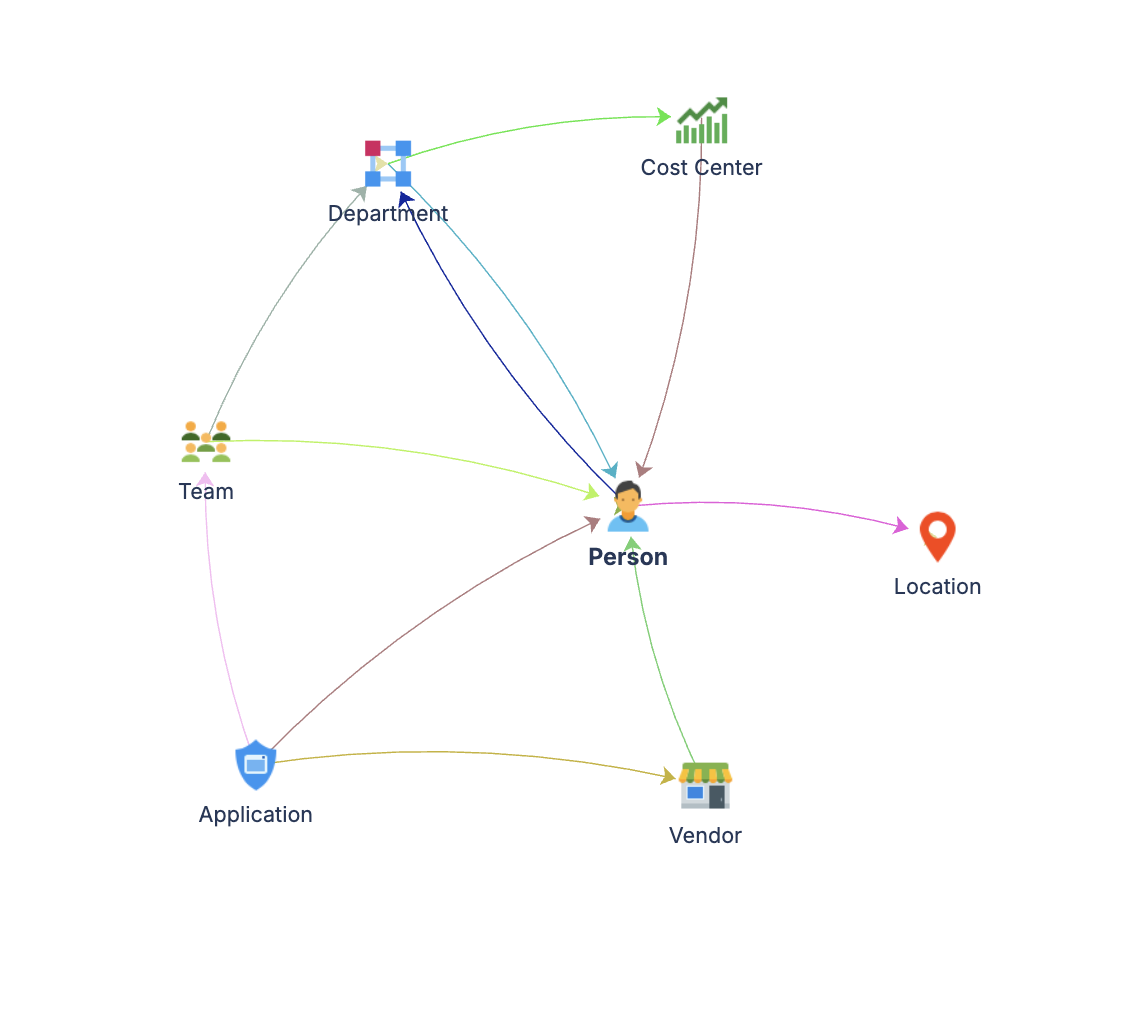
Core Schema
Master data: people, teams, vendors, applications.
Audit the forms you already have. Before you build more.
Per-project audit of fields, screens, and request types. Surfaces redundant fields, missing context, and enrichment opportunities so you can simplify the setup instead of pile on top of it.
A raw recording, not a tutorial. Full walkthrough videos are on the way.
Everything the platform does. Honestly grouped.
5 shipped · 2 in development · 3 on the roadmap
We label what is in dev as in dev. If you need a feature for a date, ask before you buy.
- 01Structured Assets models
13 structured Assets patterns across four model groups, from Basic CMDB to Enterprise IT.
- 02Environment Analysis (Scan Your Environment in the app)
Read-only scan of your service desks, request types, and custom fields. Recommends the service models that match what it finds. Changes nothing until you install.
- 03Workbook Engine (Import and Export in the app)
Generates a guided Excel workbook for any installed schema, one sheet per object type. On upload, every value is checked against the live schema through the Assets API before anything is written.
- 04Request Flow Analysis (Request Field Analyser in the app)
Scans a live service desk and flags free-text fields that would work better as structured Assets pickers. Creates the field and hands you the exact configuration recipe to apply.
- 05Forge-native security
Runs inside your Atlassian tenant. No external runtime services. No customer data export by LaunchPad.
- 01Automation rules
Auto-generated automation rules installable directly through the LaunchPad UI.
- 02Continuous health monitoring
Ongoing health checks across your installed schemas with prioritised recommendations.
- 01CMDB Advisor for Rovo (coming)
A Rovo capability that will advise on your Assets structure: explaining schemas and relationships, guiding population order, and suggesting AQL. It will run on Rovo, so it will work on sites where Rovo is active. Not in the app yet.
- 02Merge Engine (coming)
Schema extension and alignment: it will merge object types, align structures across schemas, and model additively onto what you already have. In development, arriving in the same release as CMDB Advisor for Rovo.
- 03Deployment analytics
Dashboard showing what has been deployed, when, and how much of your Jira it covers.
Start with a scan.
Install LaunchPad from the Atlassian Marketplace, and the read-only scan is the first thing it runs, or book a walkthrough with LTS first. Either way you see what it finds before you change anything.